How to Track MAF Training with Strava
Strava shows five max-heart-rate zones, not a single MAF ceiling. Here's how to track MAF training with Strava, set custom zones, and read your aerobic data.
If you train by the MAF method and record your runs on Strava, you have probably noticed the two do not quite fit together. Strava is where your activities already live, but it was not built to track a single aerobic ceiling. It thinks in five heart rate zones based on your maximum heart rate, while MAF training is built around one number: your maximum aerobic heart rate. This guide explains exactly how to track MAF training with Strava, the custom-zone workaround that gets you close, where Strava falls short, and how to fill the gap.
If you do not have your number yet, the MAF calculator gives you a personalized maximum aerobic heart rate in about ten seconds. Everything below assumes you know that ceiling.
Why Strava doesn't track MAF training natively
Strava and MAF use two different models of heart rate, and that is the root of the friction.
Strava categorizes every activity into five zones based on a percentage of your maximum heart rate. By default it estimates your max HR with the formula 220 minus age, then splits the range into Zone 1 (Endurance), Zone 2 (Moderate), Zone 3 (Tempo), Zone 4 (Threshold), and Zone 5 (Anaerobic). The point of this model is to show you a spread of intensities across a workout.
MAF training does the opposite. Dr. Phil Maffetone's 180 Formula gives you a single maximum aerobic heart rate (180 minus your age, adjusted for health and training history), and the entire method is about keeping your heart rate at or below that one ceiling. There is no spread to chase. There is a line you stay under.
So when you open a run in Strava, it will happily tell you that you spent 40 percent of it in Zone 2 and 35 percent in Zone 3. What it will not tell you, without some setup, is how much of that run was actually below your MAF heart rate, because Strava has no concept of your MAF ceiling.
One more thing to know up front: heart rate zone analysis on Strava is a subscriber feature. Free accounts record heart rate data, but the per-activity zone breakdown, custom zones, and Relative Effort all sit behind the paid subscription, as Strava's own training zones documentation confirms.
MAF heart rate vs Strava heart rate zones
The single biggest source of confusion is treating "MAF" and "Strava Zone 2" as the same thing. They are not.
| MAF method | Strava zones | |
|---|---|---|
| Formula | 180 − age (aerobic ceiling) | 220 − age (max HR estimate) |
| What it measures | Maximum aerobic heart rate | Percentage of maximum heart rate |
| Number of targets | One ceiling | Five zones |
| Goal | Stay at or below the ceiling | See the spread across zones |
| Cost on Strava | Not represented natively | Subscriber feature |
A worked example makes the gap obvious. A 40-year-old has a MAF heart rate of roughly 140 bpm (180 − 40). On Strava's default model, the same athlete has an estimated max HR of 180 bpm (220 − 40), which puts 140 bpm at about 78 percent of max, landing near the top of Zone 2 or the bottom of Zone 3 depending on how Strava splits the bands.
That is the trap. "Keep it in Zone 2" is a rough approximation of MAF at best, and for many athletes it is wrong, because Strava's zones are anchored to an estimated max HR that may not match your real physiology. If you want a deeper comparison of the two frameworks, I wrote a full breakdown in Zone 2 vs MAF training.
Make sure your Strava runs have accurate heart rate data
None of this works without clean heart rate data, and this is where a lot of MAF runners quietly go wrong.
An activity only carries heart rate data if it was recorded with a device that has a heart rate sensor. If you run with just your phone, there is no heart rate to analyze. You need a watch with an optical sensor or, better for MAF, a chest strap. Wrist-based optical sensors are convenient but tend to lag and occasionally spike at the steady low intensities MAF runs live at, which is exactly the range where a few wrong beats per minute change whether Strava counts you as in zone or over it. A chest strap reads the electrical signal directly and is more reliable for this kind of training.
One Strava-specific trap worth knowing: heart rate data from another app or service, such as Apple Health, cannot be merged into a Strava activity after the fact. The heart rate has to be recorded by the device that created the activity. So if your watch records to Apple Health but the activity reaches Strava without the HR stream, you cannot bolt the heart rate on later. Record with a device that sends both the activity and its heart rate straight through.
How to set up your MAF zone in Strava
If you have a Strava subscription, you can bend its five-zone model to make your MAF ceiling visible. It is a workaround, not a native feature, but it works.
Step 1: Get your exact MAF heart rate
Run the 180 Formula and apply the health modifiers honestly. The size of the adjustment matters: major illness, surgery, or regular medication subtract 10; injury, frequent colds, allergies or asthma, or being new to (or returning to) training subtract 5; two years of consistent, injury-free training adds 5. The 180 Formula breakdown covers the full set. Write down the single ceiling figure. That is the boundary you care about.
Step 2: Set custom heart rate zones
On desktop, go to your profile Settings, then My Performance, and choose the Custom Heart Rate Zones option. Strava lets you enter your max heart rate and slide the zone endpoints along the scale. The trick is to position one of the zone boundaries exactly at your MAF heart rate.
The cleanest setup is to make the top of Zone 2 equal to your MAF HR. Then "time in Zone 1 plus Zone 2" becomes "time at or below MAF," and Zone 3 and above becomes "time over MAF." It is not labelled that way, but the boundary now means something to you.
A few constraints to know: Strava's zones cannot overlap, consecutive zones must differ by at least one unit, and the max HR cap is 230 bpm. Also important, Strava only recalculates your historical activities the first time you set zones. After that, zone changes apply to future activities only, so set this up carefully the first time.
Step 3: Read time-in-zone on each run
After a run uploads, open the activity, tap View Analysis (mobile) or click Heart Rate under Analysis (desktop), and scroll to Heart Rate Zones. You will see the percentage of time spent in each zone. With your boundary set at MAF HR, the Zone 1 and Zone 2 share is your MAF compliance for that run.
The real-time Heart Rate chart is also useful here. It plots your heart rate across the whole activity over an elevation profile, so you can see exactly where you drifted above your MAF ceiling, usually on climbs, and how long it took to settle back down.
Where tracking MAF in Strava alone falls short
The custom-zone trick gets you a usable signal, but it has real limits, and these are the exact complaints that show up in the Strava community when MAF runners ask for better support.
- It is an approximation of one number inside a five-zone model. You are reading "Zone 1 + Zone 2" and mentally translating it to "below MAF." There is no clean "in MAF zone" percentage.
- No aerobic trend over time. The whole point of MAF is watching your pace at MAF HR improve across weeks and months. Strava's per-activity zone view does not give you that progression in MAF terms.
- It requires a subscription. No subscription, no zone analysis at all.
- Historical data is mostly frozen. Because Strava only recalculates the first time you set zones, your back catalogue of runs will not retroactively reflect a later MAF adjustment.
- No MAF test tracking. The MAF test, running a fixed distance at your MAF HR and tracking pace month over month, is the single best progress metric in the method, and Strava has no native way to surface it.
None of this is a knock on Strava. It is a general training platform doing general training things well. It simply was not designed around a single aerobic ceiling, which is why MAF runners keep asking for something it does not provide.
How to track MAF training with Strava and AerobAce
I run AerobAce, and the reason it exists is exactly this gap. I wanted to keep recording on Strava, where my activities and my friends already are, but actually see my training in MAF terms without fighting a five-zone model.
The setup takes a couple of minutes. You connect your Strava account once, set your MAF heart rate (or let the calculator carry it over), and from then on every activity that syncs from Strava is automatically scored against your exact MAF zone. Not an approximation of Zone 2. Your real 180-Formula ceiling.
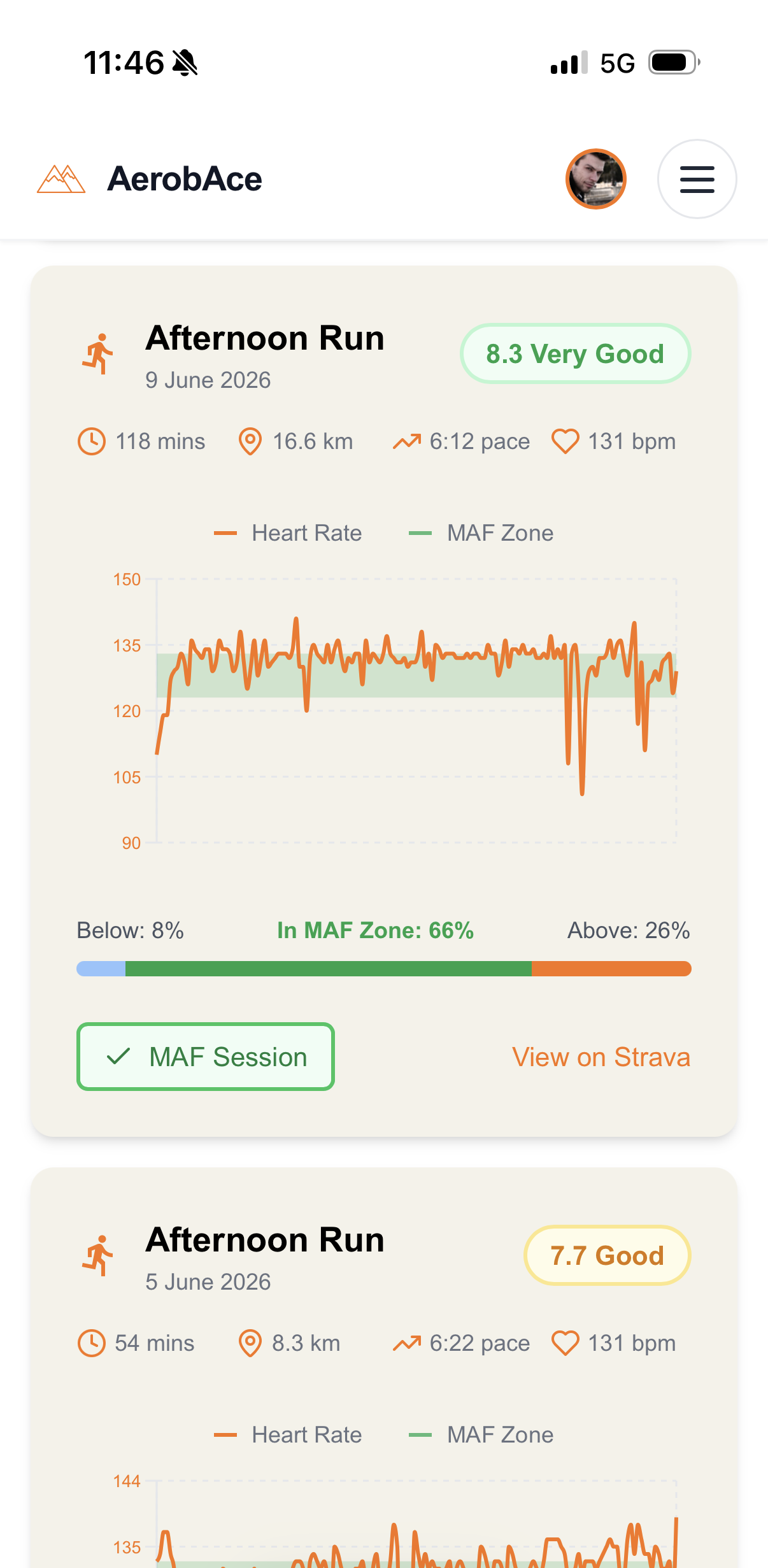
For each run you see how much time was below, in, and above your MAF zone, in plain MAF language. Across weeks you see whether your pace at MAF HR is improving, which is the honest measure of whether the slow running is working. And because it reads from Strava through the official connection, you do not change anything about how you record. You keep using your watch and Strava exactly as you do now.
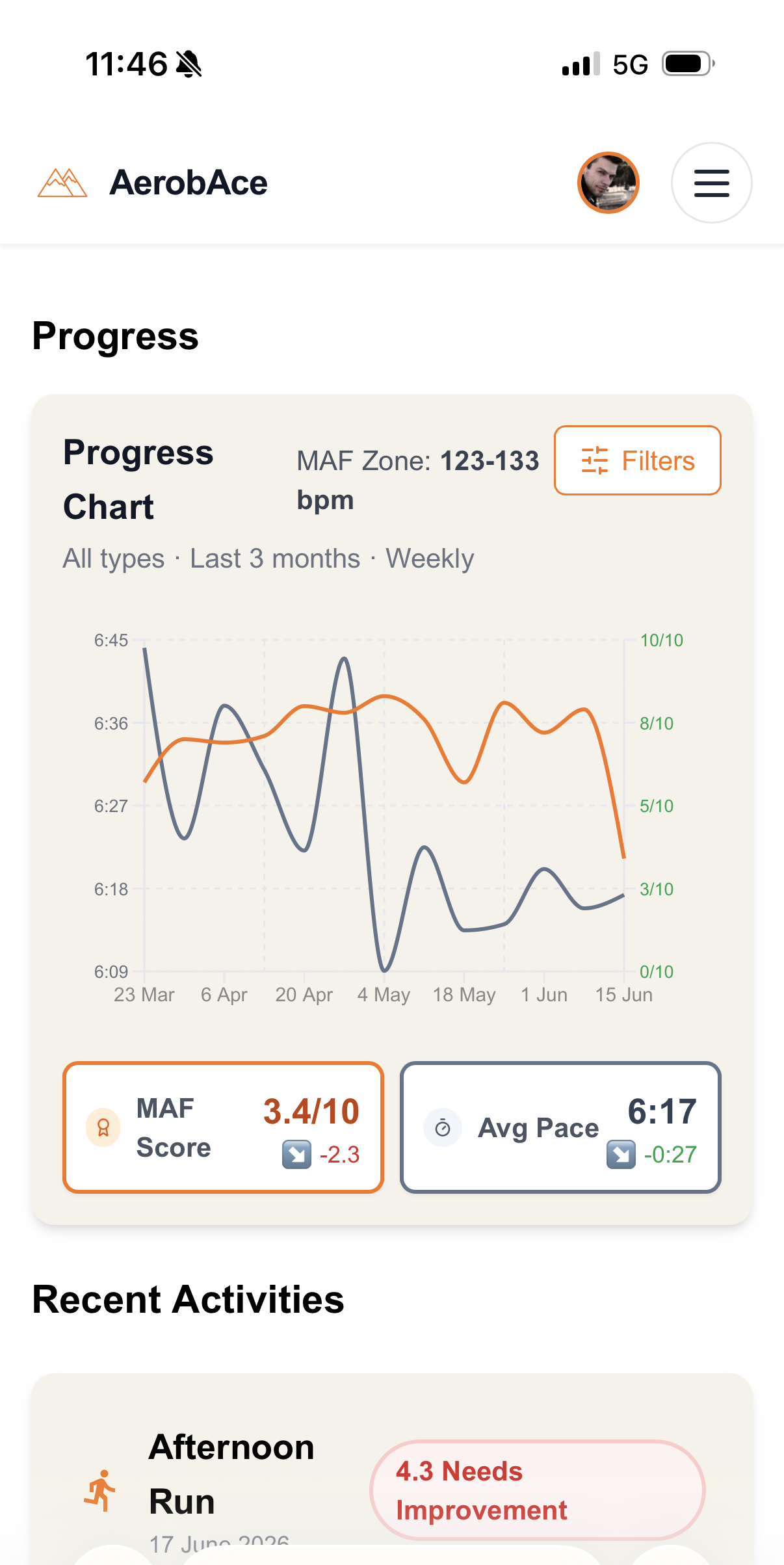
That is the model I would recommend to any MAF runner: record on Strava, read your aerobic progress somewhere built for MAF. If you want to understand what "good" progress actually looks like, what is a good MAF pace sets realistic expectations, and the complete guide to MAF training covers the method end to end.
FAQ
Does Strava have a MAF zone?
No. Strava does not have a native MAF zone or a 180-Formula setting. It uses five heart rate zones based on a percentage of your estimated maximum heart rate (220 minus age by default). You can approximate a MAF ceiling by setting custom heart rate zones as a subscriber and placing a zone boundary at your MAF heart rate, but Strava will never label or track it as "MAF."
Can I see my MAF heart rate on Strava?
Only indirectly. If you subscribe and set custom heart rate zones with the top of Zone 2 at your MAF HR, the time-in-zone breakdown on each activity effectively shows your MAF compliance. There is no dedicated MAF view. For a true MAF-zone score on every run plus your aerobic trend over time, you need a tool built around the method, such as connecting Strava to AerobAce.
Do I need a Strava subscription to track MAF training?
To use Strava's heart rate zone analysis, yes. Per-activity zone breakdowns, custom zones, and Relative Effort are subscriber features. A free Strava account still records heart rate data, so you can connect it to a MAF-specific tool that does the zone scoring for you, which sidesteps the paywall for MAF tracking specifically.
What is the difference between MAF heart rate and Strava's Zone 2?
MAF heart rate is a single aerobic ceiling from the 180 Formula (180 minus age, adjusted). Strava's Zone 2 is a band defined as a percentage of your estimated maximum heart rate. They sometimes overlap, but they are calculated differently and built for different purposes, so "stay in Zone 2" is not a reliable substitute for "stay at or below your MAF HR."
How do I track my MAF test on Strava?
Strava has no native MAF test feature. The workaround is to record the test as an activity (a fixed distance or duration run at your MAF HR), then manually note your pace and compare it to previous tests. Because this is tedious and easy to lose track of, most MAF runners use a dedicated tool that flags MAF test activities and charts the pace trend automatically.
See Every Strava Run in MAF Terms
Connect Strava once and AerobAce automatically scores every run below, in, or above your real MAF zone, then tracks your aerobic progress over time. No custom-zone workarounds, no fighting Strava's five-zone model. Free to start.
Start Tracking Free